
ProVision Updates: Auto-Fill Site Docs, Push Notifications, Smart Send, and More...
New tools to streamline documentation, improve visibility, and keep your service operations humming!
Our latest set of new features delivers powerful functionality designed to simplify your workflows, reduce manual input, and ensure nothing falls through the cracks. From AI-powered documentation to mobile push notifications and smarter message handling, these updates make it easier than ever to deliver responsive, personalized service with less effort.
Read on for the full breakdown...
Auto-Fill Site Documentation 📂
Say goodbye to tedious data entry. ProVision now offers AI-powered auto-fill for Site Documentation, allowing you to instantly populate documentation fields using information contained in site files.
Here’s how it works:
- Upload a PDF—like a system proposal, design doc, or rack layout.
- Click the “Auto-Fill Site Documentation” button.
- Let ProVision scan the files and intelligently extract key details—then automatically fill out the corresponding fields.
This update is designed to eliminate redundant manual input and significantly speed up your documentation workflow. By making it easy to transform static files into structured, actionable data, you’ll ensure that frontline support teams have the rich context they need to deliver faster, more personalized service.

Introducing Push Notifications 📂
You asked, we delivered. Based on direct partner feedback, ProVision now supports push notifications to your devices, making it easier than ever to stay informed, especially when you're on the go.
To get started, head to Notifications in the left-hand menu, enable push notifications for your device, and choose which events you'd like to be alerted about. From new Conversations to shift reminders, you'll receive real-time updates—so you never miss what matters most.
For full setup instructions, follow this step-by-step guide.

Activity Feeds 📂
Track changes and gain clarity across every relationship. We’ve introduced new Activity tabs to both Client and Site records in ProVision, offering real-time visibility into what’s changed, when, and by whom.
Each tab provides a chronological feed of key updates, giving you an easy way to view historical information:

You can also now view ticket-specific activity directly from any Conversation. Just click the three dots in the top-right corner and select “Show Activity” to trace the full history of a ticket—ideal for understanding what happened, when, and why.

Drafts 📂
ProVision now automatically saves your unsent messages as drafts—for up to 10 days. Start typing, then switch conversations, refresh your browser, or even step away entirely. When you return, your draft will still be there waiting.
You can access all your in-progress notes and replies in My Drafts, where you can pick up where you left off, send, or delete with ease.

Smart Send 📂
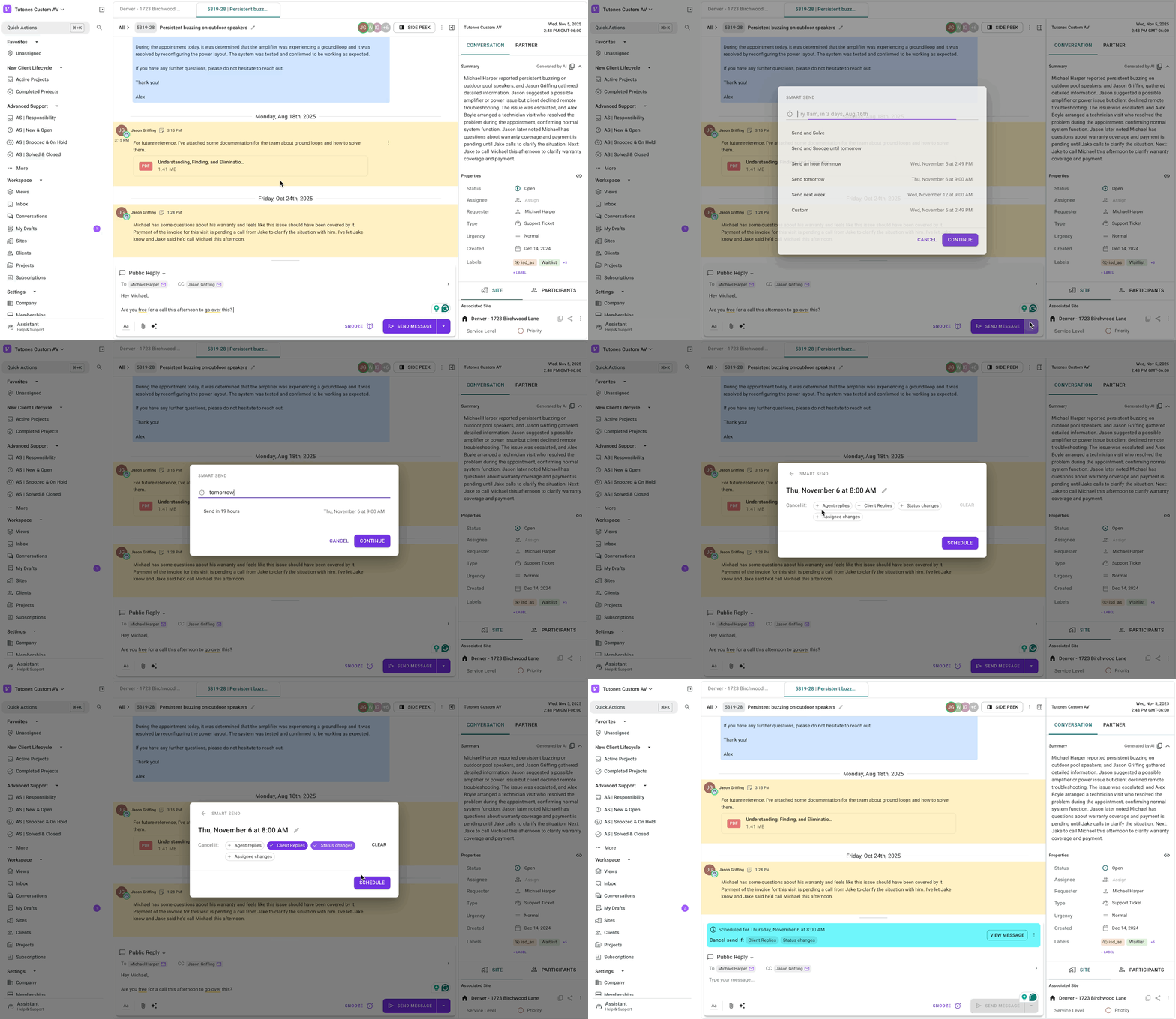
Take control of your timing and workflow. With smart sending, ProVision lets you decide what happens when you hit send: act immediately, pair it with an action, or schedule it for later.
Choose from options like:
- Send and Solve: Close the loop with one click.
- Send and Snooze: Pick it up tomorrow or next week.
- Send Later: Schedule delivery for a specific time, such as tomorrow at 9 AM or any custom date and time.
Don't have access to ProVision yet? If you're an integrator looking to differentiate your brand through world-class client service, let's talk!
We'd love to show you how we help integrators like you boost client satisfaction, drive profitability, and reduce employee burnout!


